AI × INDUSTRY × PEOPLE

Real work.
Understood.

AI SOP uses product recipes to verify critical actions and their sequence, recording the outcome and evidence for each cycle.

Evidence for each step. A record for each exception.

An operator standing beside a robotic arm workstation, with floating diagrams illustrating the work

Verify the result. Understand the process.

A finished result may not reveal whether every critical step was completed in order. When an exception occurs, knowing which step was involved matters.

Step omissions

Was the critical operation completed?

Sequence deviations

Was the right action taken at the right time?

Limited traceability

Can we return to what happened?

SOP in action

Observe the operation. Verify each step.

Pick, position, fasten. Verify both critical steps and their sequence. Choose a path to explore how decisions are made.

Pick part
Person
Tool
Part
AI SOPPerson → Part · PickingViewing step: Pick part
Observation progress 0/3
Step details

Pick part

Relate the operator’s contact with the part to the picking step. The tool remains at the workstation and is not yet involved.

Awaiting step observations

Operating boundaries

Validate camera views, lighting, occlusion, fixtures and movement variations before deployment. Define device protocols and triggers, and confirm interface permissions and data fields.

Discuss your operation

Document the process. Trace the outcome.

Connect actions with steps, states with outcomes. Select a step to find its place in the process record.

Assembly process record

Pick part

Pending

Require the part to enter the observation area to confirm picking.

Review this step ↖
Step events
What action occurred
Sequence
How actions connect
Decision criteria
Whether requirements are met
Process context
Trace an outcome back to its steps
Field validation

Real conditions. Verified capabilities.

Confirm workstation conditions and critical steps. Validate decision rules with site samples, then define deployment and acceptance criteria.

Site constraints

Workstation, lighting, occlusion and process variation

Validation method

Sample coverage, exception definitions and decision criteria

Operational evidence

Actual footage, records and interface responses

Acceptance boundaries

Confirm deliverable capabilities under agreed conditions

Validation covers lighting, occlusion, fixtures and variations in movement.

Explore selected engagements ↘
Selected engagements

Real environments. Practical applications.

Different production environments require different ways of observing and coordinating work. Our engagements span line balancing, factory-wide operation verification and automated-line integration. Each solution addresses a specific production need, with its implementation scope clearly defined.

BOELine balancing

40 workstationsExplore engagementClose engagement

Production challenge

Line-balancing analysis focused on production operations.

Implementation approach

Understand production rhythms across workstations through operation-level analysis.

Scope & validation boundaries

Coverage of 40 workstations.

Discuss a similar application ↗

Tianma MicroelectronicsFactory-wide operation verification

70 workstationsExplore engagementClose engagement

Production challenge

An AI SOP solution organized for an entire factory.

Implementation approach

Build a factory-wide AI SOP application around workstation-level verification.

Scope & validation boundaries

Coverage of 70 workstations across the factory.

Discuss a similar application ↗

SchaefflerAutomated-line coordination

Approximately 50 IoT devicesExplore engagementClose engagement

Production challenge

Device integration and coordination for one automated production line.

Implementation approach

Coordinate on-site capabilities through IoT, 3D motion capture and Agent.

Scope & validation boundaries

Approximately 50 IoT devices, including cameras, microphones, speakers and projection lights.

Discuss a similar application ↗

Automotive industryApplications across production settings

Magna · ZF · BAIC GroupExplore engagementClose engagement

Production challenge

Work with automotive customers across different production settings.

Implementation approach

Design solutions around specific production problems, with scope defined for each project.

Scope & validation boundaries

Customers include Magna, ZF and BAIC Group.

Discuss a similar application ↗

These engagements describe project tasks and implementation scope. Configuration and validation conditions are defined for each production site.

Explore the operations platform
Intelligence Hub · Factory collaboration

From shop-floor execution to headquarters visibility.

See how a workstation record supports process review, exception tracing and a cross-factory overview.

Workstation
Steps, durations and operation records
Factory
Workstation operation and process views
Headquarters
Factory overview, indicators and exceptions
Watch the platform film

Chinese-language demonstration · 38 seconds.

The film also illustrates model approval, scoped release and activation status feedback. Actual data, interfaces and deployment scope require project integration and acceptance.

Interface demonstration, simulated data and solution illustrations. Figures do not establish production outcomes or completed integrations.
Open the film ↗

Solutions

Choose your workstation needs to see the equipment, connections and site checks.

AI SOP deployment

From one station to multiple production areas

For stations that need to verify critical steps and their sequence. Choose how to validate work locally and collect records based on the station layout.

Single station A station camera feeds the local vision computer, which checks steps against the recipe. The operator sees feedback and records at the station.

Adjacent stations Connect network cameras from nearby stations to an edge computer over wired LAN. Size AI BOX for the camera count and inference workload. Each station has its own feedback.

Distributed stations Place AI BOX units near groups of stations in separate areas. Where unified oversight is needed, connect each area’s status and records to the Intelligence Hub as agreed for the project.

Reference topologySingle station
  • Station 1
USB or network camera
Local vision computer
Operator displays · live feedback
Reference topologyAdjacent stations
  • Station 1
  • Station 2
  • Station 3
Wired LAN · network cameras
AI BOX · shared edge compute
Operator displays · live feedback
Reference topologyDistributed stations

Area A

  • Station 1
  • Station 2
Wired LAN within each area
AI BOX · local inference

Area B

  • Station 3
  • Station 4
Wired LAN within each area
AI BOX · local inference

Approved network · status and operation records

Intelligence HubCross-area overview and exception tracing
On-site checks
Check camera connections, network cabling and inference workload, then verify edge computing capacity.
Configure a workstation topology

LightGuide station

Project the next step onto the work surface

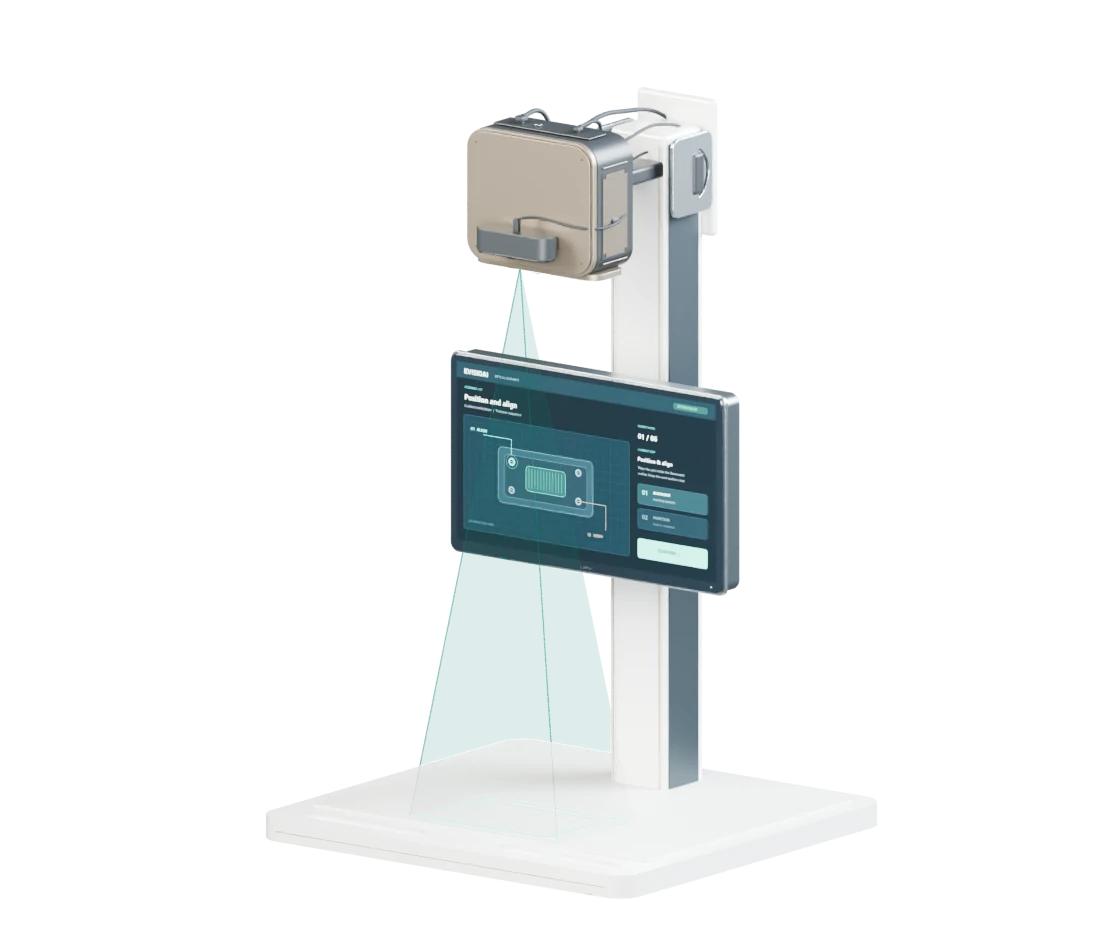
Camera input helps identify the current step. The projector shows what to do next, while the operator display provides recipe selection and status.

LightGuide station model with a camera mounted low on the projector front panel and a beam reaching the marked area on the wider work surface
LightGuide tabletop model · illustrative light path and operator screen
  1. CameraCapture the operation
  2. Vision computerEvaluate the current step
  3. Projector and operator displayProject cues and show station status

Install, configure and operate

  1. Mount and calibrate

    Mount the camera and projector and connect them to the vision computer. Check coverage, calibrate and verify with actual parts.

  2. Configure the steps

    Set detection regions and rules in the camera canvas. Design pick, assembly and verification cues in the projection canvas.

  3. Start the operation

    Select the station and recipe. In the run view, select the live camera for production and start detection. Follow the projected cues and review the cycle record if an exception occurs.

On-site checks
Check the camera field of view and projection area. After calibration, verify both with actual parts.
See how the two canvases work together

ZJBOX display

Show the workstation view on a large display

For viewing a workstation camera feed on a large display on the same local network.

  1. Station computerProvide the camera view
  2. Wired LANCarry the video feed
  3. ZJBOX edge display terminalDecode the feed and output it over HDMI
On-site checks
Confirm the terminal model and firmware. Test continuous refresh, remote control, reconnection and the keep-awake setting on site.

AI SOP and connected operations

AI SOP verifies steps and keeps records at the workstation. LightGuide projects instructions onto the work surface. The Intelligence Hub extends visibility to factories and headquarters.

How AI SOP supports one work cycle

  1. Before the cycle

    Set up the recipe

    Define critical steps, their sequence and acceptance rules for the product. Retest with representative samples.

  2. During the cycle

    Verify the steps

    Check actions and their sequence against the recipe. Show the current step and its result at the station.

  3. After the cycle

    Trace exceptions

    Find a cycle by workstation or product ID, then review the affected step, the reason and related evidence.

Explore technical capabilities and interfaces
Product recipes and step configuration
Organize product recipes and revision history by workstation, with saving and activation kept separate. Configure visual, scanner and device actions, sequence, dependencies, counts and timeouts.
Visual tasks and geometric conditions
Use supported models for detection boxes, oriented boxes, keypoints/skeletons and segmentation masks. Define conditions using regions, distances, angles and coverage.
Visual prompts and sample evaluation
Extract frames from trusted images or video, annotate positive and negative visual prompts, and evaluate candidates. Update recognition targets for supported models; prompt updates are not model training.
Operation control and product identity
Organize operation by workstation, recipe and partition, with pause, resume, changeover and scanner events. Associate product identifiers as configured and distinguish exceptions from interruptions.
Cycle evidence and process analysis
Find cycles by workstation, product code, date and outcome. Review steps, exception reasons, images and video retained by policy, analyze durations and trends, and export evidence.
Standard interfaces and collaboration
Connect inputs, operation control and result queries through agreed HTTP interfaces. Coordinate with LightGuide and the Intelligence Hub; validate interfaces, network scope and data connections for each project.

Companion products and integration

LightGuide SOPBring step instructions to the workstationView capabilities and integration

One canvas for detection. One for guidance.

Camera detection
Configure the current step’s ROI and visual conditions on the camera canvas.
Step rules
Define step dependencies, completion conditions and status feedback.
Projected guidance
Arrange text, shapes and step prompts on the projection canvas.
Dual-canvas concept diagram · Not a software screenshot or field result. Projection requires on-site calibration and validation.

Production challenge

How can instructions and completion conditions refer to the same step on the shop floor?

Product capabilities

Configure the current step’s detection region on a camera canvas and text, graphics and status feedback on a projection canvas. Use hand signals, model classes and step dependencies to define progression.

AI SOP integration & requirements

Local calibration regions, manual point pairing and independent validation support setup; step feedback and records support review. Validate cameras, projection surfaces, lighting, occlusion and integration on site. Calibration is required for the agreed working area.

Discuss integration ↗
3D motion captureUnderstand movement and spatial relationshipsView capabilities and integration

Production challenge

How can movement and spatial relationships beyond a single 2D frame be understood?

Product capabilities

Capture human pose and 3D skeleton data, providing movement and spatial context through agreed interfaces for digital twins and other systems.

AI SOP integration & requirements

Add motion and spatial information to operation understanding. Calibrate and synchronize capture. Delivery ends at the agreed skeleton data interface; validate site samples.

Discuss integration ↗
IoT + AgentConnect equipment and data interactionsView capabilities and integration

Production challenge

How can operation decisions connect with equipment and business systems?

Product capabilities

Connect workstation lights, projectors and speakers; prioritize commands, retain execution responses and query status through an agent.

AI SOP integration & requirements

Connect operation decisions with device feedback. Confirm protocols, permissions and triggers. No direct control of PLCs, safety systems or critical alarm resets.

Discuss integration ↗
Intelligence HubFrom headquarters overview to factory and workstation detailView capabilities and integration

Production challenge

How can teams move from the overall status of multiple factories to a specific operation?

Product capabilities

Organize views by headquarters, factory and workstation: review indicators and exceptions at headquarters, workstation status at the factory, then images, steps, durations and process records at a workstation.

AI SOP integration & requirements

Connect an overview with a path to the shop floor. Validate factory data, metric definitions, video and AI services, business system connections and deployment across factories within each project. Display data does not establish production results.

Discuss integration ↗

Verification at each workstation. Coordination across the system.

AI SOP is the core. Visual capture provides observations, edge computing evaluates steps, and management and interfaces connect records, equipment and production systems.

Start with one workstation and extend the same architecture. Verify work locally and organize process records across the system.

  1. Observation and capture

    Camera images → Objects and actions

  2. Verification at the edge

    Action events → Step rules → Decisions and feedback

  3. Management and coordination

    Process records → Workstation management / Equipment interfaces / Business systems

Configure your workstation topologyDeployment, device coordination and interface permissions are defined per site; the system remains outside safety control loops.

Project delivery

Prepare your SOP, workstation details and representative samples. We agree on site conditions and integration scope before running a trial and checking acceptance against the agreed criteria.

  1. Site survey

    Confirm processes, workstations, camera views, lighting, occlusion, cycle times and equipment conditions. Define goals and boundaries.

  2. SOP and sample preparation

    Review SOPs, critical steps and exception definitions. Prepare representative operation video and normal and exception samples.

  3. Hardware, licensing and model setup

    Select hardware and software licensing for the site plan, then configure workstations, models and decision rules.

  4. Integration and calibration

    Test agreed device and business-system interfaces, with camera or motion-capture calibration and synchronization where required.

  5. Operation and maintenance training

    Train teams in configuration, operation, record queries and exception handling, and clarify routine maintenance responsibilities.

  6. Agreed trial and acceptance

    Run a trial under agreed conditions and review the delivery scope against jointly confirmed samples, rules and acceptance criteria.

Hardware, software licensing, data access, sample preparation and acceptance scope are agreed per project. Scheduling depends on site conditions and mutual agreement.

Discuss your operation

Frequently asked questions

What is AI SOP (AISOP) visual behavior detection?

AI SOP connects visual recognition, scanner or device events with configured product recipes, step conditions and sequence rules at industrial workstations. It verifies critical actions and links cycle outcomes to step evidence, exception reasons and product identifiers. Models, camera views, action conditions and site samples must be configured and validated for each process.

What work is AI SOP suited to? Is it plug-and-play for any process?

It suits work where key actions and their sequence can be observed from the installed camera view. Applicability depends on camera angle, lighting, occlusion, fixtures, and variations in how work is performed. Each process needs configured views, models, and rules, followed by validation with site samples; it is not plug-and-play for every task.

Can the system expand from one workstation to multiple stations?

A project can start at one workstation and expand across multiple stations. Cameras, edge computers, interfaces, and configuration are planned for the site. Station capacity, concurrency, and real-time performance require separate on-site assessment.

Is a process record the same as video?

Process records capture cycles, steps, decision evidence and exception reasons, searchable and exportable by workstation, product identifier, date and outcome. Images and video depend on actual capture and retention settings. Video may be disabled, limited to NG events, or retained for both OK and NG. A record does not guarantee a video; missing or failed evidence cannot be reported as saved.

How does AI SOP collaborate with LightGuide, the Intelligence Hub and other products?

LightGuide projects step instructions and feedback at a workstation, while AI SOP verifies operations against recipes. The Intelligence Hub connects overview and shop-floor views across headquarters, factories and workstations. Data and trigger interfaces are agreed per project, rather than assumed to be connected. 3D motion capture and IoT/Agent integrations retain agreed calibration, output and command boundaries and stay outside the site safety control chain.

What does the AI SOP software cover?

It covers product recipes, step and action rules, workstation partition operation, detection/oriented boxes/keypoints/segmentation, geometric conditions, visual prompt updates and sample evaluation for supported models, product-code association, cycle evidence, exception traceability and process analysis. Prompt updates are not training. Interface availability, hardware and site applicability depend on the actual version and project. Industrial Physical Intelligence remains a long-term vision.

How does the platform integrate with existing business systems?

Agree the data flow for workstations, recipes, input events, operation control and result queries, then define the interfaces actually available, network scope, fields and acknowledgements before integration testing. Workstation execution, hierarchical Intelligence Hub views and business system connections require separate acceptance. Interface documentation does not mean that any MES, PLC or data connection across factories is already integrated.

What should we prepare, and how does delivery proceed?

Prepare SOPs, workstation and equipment information, representative operation video, and normal and exception samples. Delivery proceeds through a site survey, sample review, hardware and software licensing and model setup, integration and any required calibration, training, then an agreed trial and acceptance. Scheduling and acceptance scope depend on site conditions and project agreement.

Product Experience

Use a device code issued by KVISIOAI to claim a sample package. Production installers are currently unavailable.

Starting with AI SOP

From operation verification to industrial intelligence.

Start with AI SOP operation verification and connect configuration, operation, traceability and analysis. LightGuide and the Intelligence Hub collaborate around shop-floor tasks as process intelligence develops. Build the longer-term vision of Industrial Physical Intelligence on demonstrated capabilities.

  1. Current product

    AI SOP

    Understand human work. Verify critical steps and sequence.

  2. Mature platform

    AI SOP Platform

    Connect configuration, verification, traceability and analysis, with LightGuide and Intelligence Hub collaboration.

  3. Advancing process intelligence

    Human Operation Intelligence

    Structure production processes. Link actions, steps, states and outcomes.

  4. Long-term vision

    Industrial Physical Intelligence

    From understanding human work to broader industrial physical intelligence.

Operation verification is the starting point. Platform coordination extends its reach, while process data provides the foundation for deeper industrial intelligence.

Return to product coordination
About KVISIOAI

Technology that understands work. A commitment to the people behind it.

Suzhou Zhongjun Vision Technology Co., Ltd. develops AI SOP and industrial operation products under the KVISIOAI brand, connecting recipes, operation verification, cycle traceability and process analysis with LightGuide and the Intelligence Hub. We respect the people doing the work and use clear criteria to assess every result. From individual workstations to factory collaboration, we deepen process intelligence and build the long-term vision of Industrial Physical Intelligence on real capabilities.

Warmth in our brandRigor in our productsDepth in our technologyAmbition in our vision
Explore the roadmap
For customers

Your production needs. Our starting point.

Start with a process, the operation rules for a product, or a need to manage work across stations. Discuss the conditions and implementation scope for AI SOP, LightGuide and the Intelligence Hub.

Investment & industry partnerships

Validate value through products. Advance growth through partnership.

Built on AI SOP and our mature operation intelligence platform, our reusable capabilities connect operation verification, process data, equipment and business systems. We welcome investors and industry partners with a long-term view to explore strategic investment, joint applications and market partnerships, extend industry applications, deepen process intelligence and pursue scalable growth.

Careers & collaboration

Solve problems through technology. Create value through products.

Join us if you are passionate about machine vision, operation understanding and industrial intelligence. Contribute across field validation, algorithm and system development, product iteration and applications on a mature platform, taking technology into practical use. Gain experience in real projects, deepen your expertise through our core products and turn production challenges into reusable capabilities, advancing your own development alongside the product.